eMMC
Table of Contents
1. eMMC 简介
eMMC 是 embedded MultiMediaCard 的简称,即嵌入式多媒体卡,是一种闪存卡的
标准,它定义了基于嵌入式多媒体卡的存储系统的物理架构和访问接口及协议,具体由电子
设备工程联合委员会 JEDEC 订立和发布。它是对 MMC 的一个拓展,具有体积小,功
耗低,容量大等优点,非常适合用作智能手机、平板电脑、移动互联网设备等消费类电子设
备的存储介质。
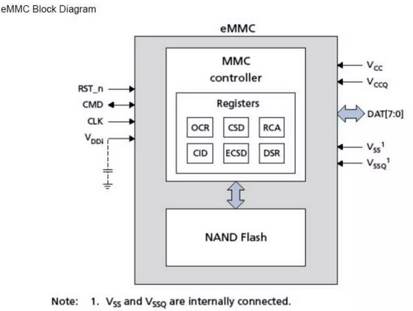
2. eMMC 结构框图
3. eMMC 常用寄存器
3.1. Operation Conditions Register(OCR)
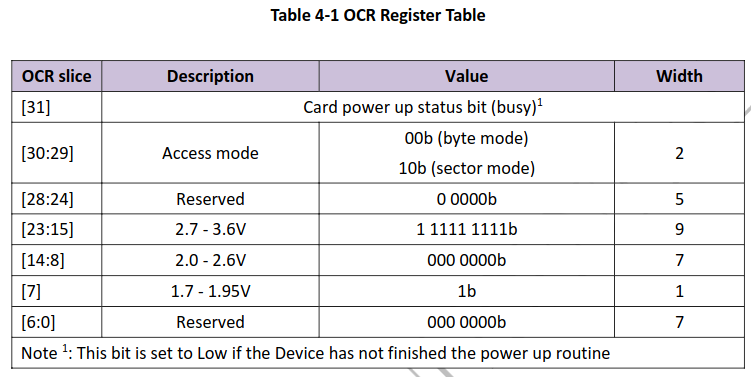
工作条件寄存器,包含 32bit ,内容如下:
3.1.1. 读取 OCR 寄存器
# Dump
hexdump -C /sys/block/mmcblk1/device/ocr
## 00000000  30 78 30 30 33 30 30 30  30 30 0a                 |0x00300000.|
## 0000000b
3.2. Card IDentification Register(CID)
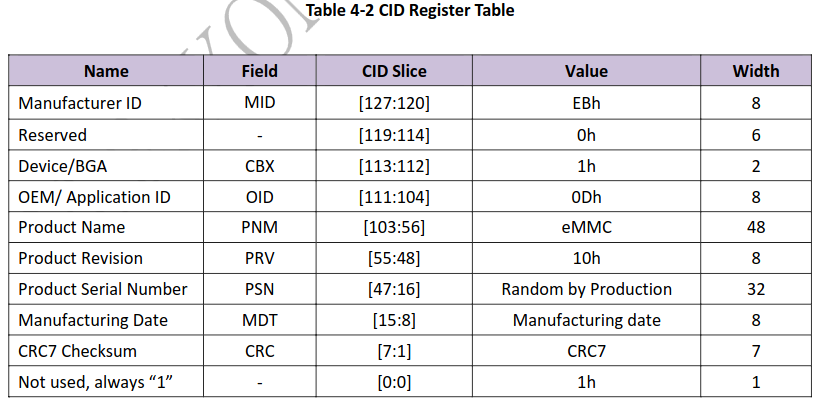
设备身份寄存器,包含 128bit ,内容如下:
3.2.1. 读取 CID 寄存器
# Read CID Register
mmc cid read /sys/block/mmcblk1/device
## type: 'MMC'
## manufacturer: 'Unlisted' ''
## product: 'SPeCCC' 0.21523
## serial: 0x00000001
## manfacturing date: 1999 oct

# Other path read
mmc cid read /sys/class/mmc_host/mmc1/mmc1\:0001/
## type: 'MMC'
## manufacturer: 'Unlisted' ''
## product: 'SPeCCC' 0.21523
## serial: 0x00000001
## manfacturing date: 1999 oct

# Dump
hexdump -C /sys/block/mmcblk1/device/cid
## 00000000  65 61 30 31 30 65 35 33  35 30 36 35 34 64 34 64  |ea010e5350654d4d|
## 00000010  34 33 31 30 30 30 30 30  35 34 31 33 32 39 61 65  |43100000541329ae|
## 00000020  0a                                                |.|
## 00000021
3.3. Card-Specific Data Register(CSD)
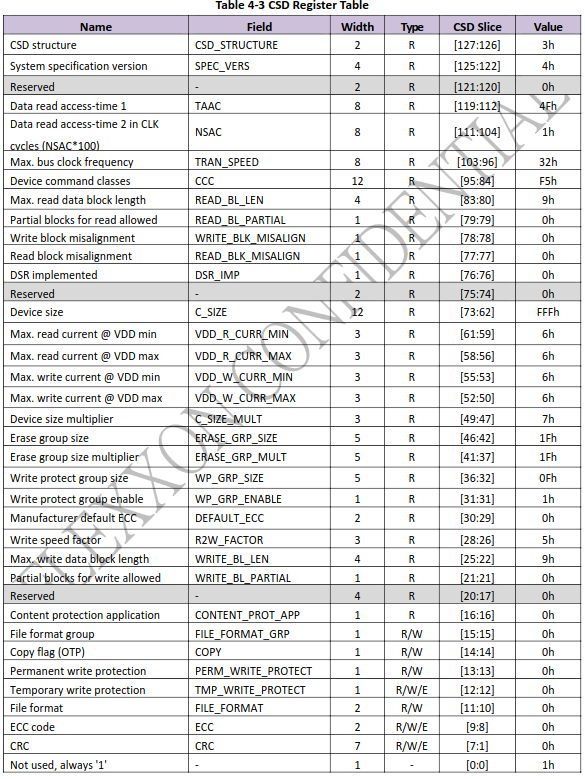
设备特性数据寄存器,包含 128bit ,内容如下:
3.3.1. 读取 CSD 寄存器
# Read CSD register
mmc csd read /sys/block/mmcblk1/device
## type: 'MMC'
## version: reserved
## card classes: 8, 6, 4, 2, 0,
## capacity: 26.66Mbyte (27959296 bytes, 54608 sectors, 512 bytes each)

# Dump
hexdump -C /sys/block/mmcblk1/device/csd
## 00000000  64 30 66 66 66 66 33 32  31 66 35 39 30 33 66 66  |d0ffff321f5903ff|
## 00000010  64 66 37 66 66 66 38 30  38 61 34 30 30 30 63 30  |df7fff808a4000c0|
## 00000020  0a                                                |.|
## 00000021
3.4. Extended CSD Register(ExtCSD)
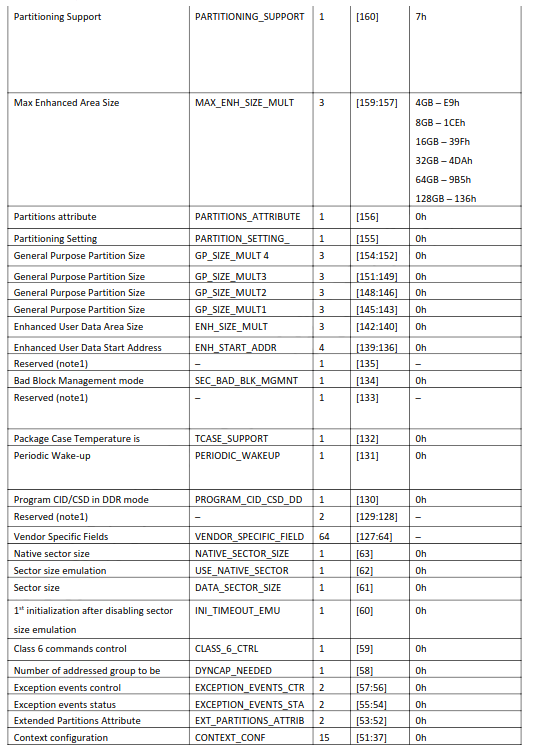
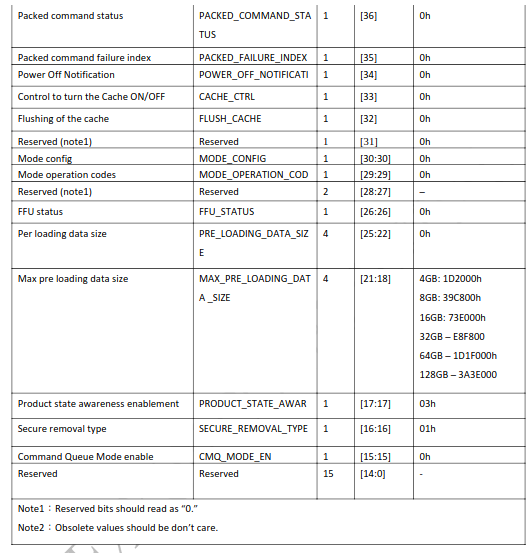
扩展设备特性数据寄存器,包含 512bytes ,内容如下:
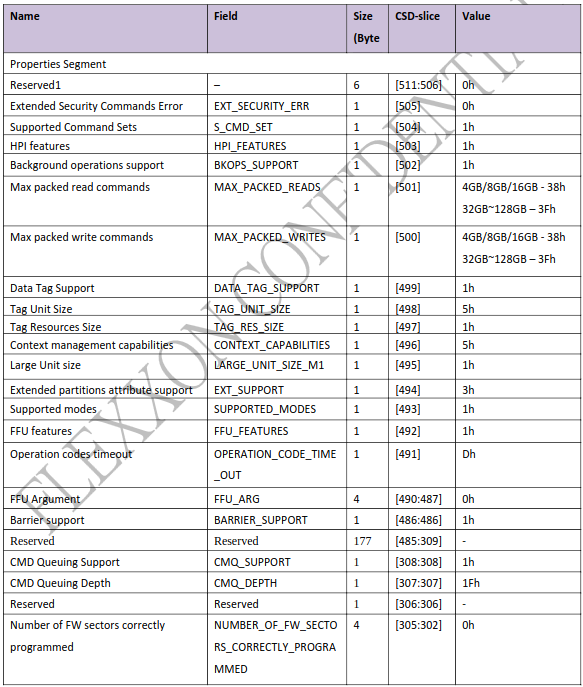
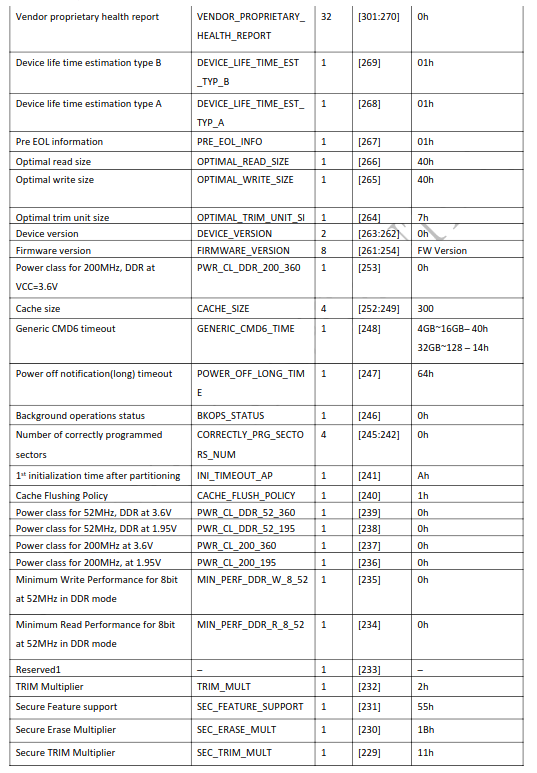
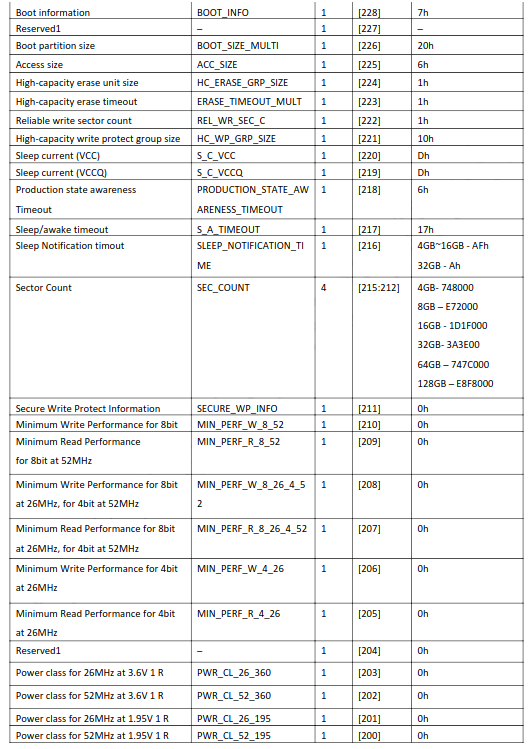
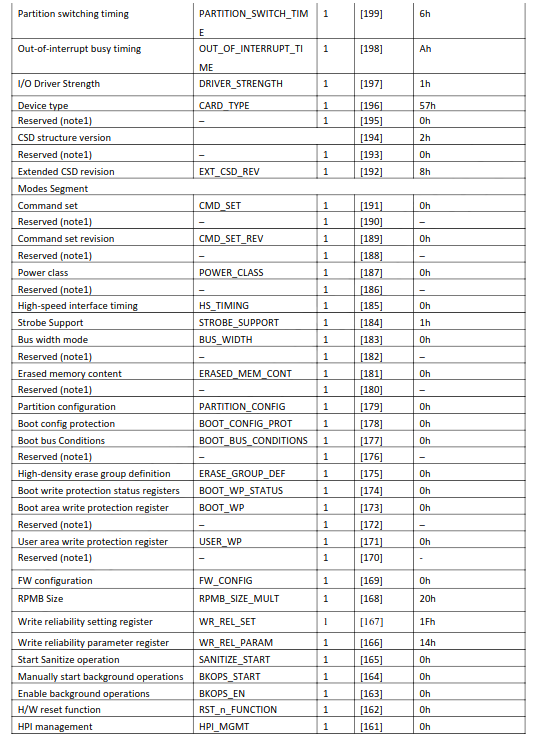
3.4.1. 读取 ExtCSD 寄存器
# Read ExtCSD register
mmc extcsd read /dev/mmcblk1
## =============================================
##   Extended CSD rev 1.7 (MMC 5.0)
## =============================================
##
## Card Supported Command sets [S_CMD_SET: 0x01]
## HPI Features [HPI_FEATURE: 0x01]: implementation based on CMD13
## Background operations support [BKOPS_SUPPORT: 0x01]
## Max Packet Read Cmd [MAX_PACKED_READS: 0x3f]
## Max Packet Write Cmd [MAX_PACKED_WRITES: 0x3f]
## Data TAG support [DATA_TAG_SUPPORT: 0x01]
## Data TAG Unit Size [TAG_UNIT_SIZE: 0x03]
## Tag Resources Size [TAG_RES_SIZE: 0x00]
## Context Management Capabilities [CONTEXT_CAPABILITIES: 0x05]
## Large Unit Size [LARGE_UNIT_SIZE_M1: 0x0b]
## Extended partition attribute support [EXT_SUPPORT: 0x03]
## Generic CMD6 Timer [GENERIC_CMD6_TIME: 0x0a]
## Power off notification [POWER_OFF_LONG_TIME: 0x64]
## Cache Size [CACHE_SIZE] is 256 KiB
## Background operations status [BKOPS_STATUS: 0x00]
## 1st Initialisation Time after programmed sector [INI_TIMEOUT_AP: 0x1e]
## Power class for 52MHz, DDR at 3.6V [PWR_CL_DDR_52_360: 0x00]
## Power class for 52MHz, DDR at 1.95V [PWR_CL_DDR_52_195: 0x00]
## Power class for 200MHz at 3.6V [PWR_CL_200_360: 0x00]
## Power class for 200MHz, at 1.95V [PWR_CL_200_195: 0x00]
## Minimum Performance for 8bit at 52MHz in DDR mode:
##  [MIN_PERF_DDR_W_8_52: 0x00]
##  [MIN_PERF_DDR_R_8_52: 0x00]
## TRIM Multiplier [TRIM_MULT: 0x02]
## Secure Feature support [SEC_FEATURE_SUPPORT: 0x55]
## Boot Information [BOOT_INFO: 0x07]
##  Device supports alternative boot method
##  Device supports dual data rate during boot
##  Device supports high speed timing during boot
## Boot partition size [BOOT_SIZE_MULTI: 0x20]
## Access size [ACC_SIZE: 0x07]
## High-capacity erase unit size [HC_ERASE_GRP_SIZE: 0x01]
##  i.e. 512 KiB
## High-capacity erase timeout [ERASE_TIMEOUT_MULT: 0x0a]
## Reliable write sector count [REL_WR_SEC_C: 0x01]
## High-capacity W protect group size [HC_WP_GRP_SIZE: 0x10]
##  i.e. 8192 KiB
## Sleep current (VCC) [S_C_VCC: 0x07]
## Sleep current (VCCQ) [S_C_VCCQ: 0x07]
## Sleep/awake timeout [S_A_TIMEOUT: 0x15]
## Sector Count [SEC_COUNT: 0x00e8c000]
##  Device is block-addressed
## Minimum Write Performance for 8bit:
##  [MIN_PERF_W_8_52: 0x00]
##  [MIN_PERF_R_8_52: 0x00]
##  [MIN_PERF_W_8_26_4_52: 0x00]
##  [MIN_PERF_R_8_26_4_52: 0x00]
## Minimum Write Performance for 4bit:
##  [MIN_PERF_W_4_26: 0x00]
##  [MIN_PERF_R_4_26: 0x00]
## Power classes registers:
##  [PWR_CL_26_360: 0x00]
##  [PWR_CL_52_360: 0x00]
##  [PWR_CL_26_195: 0x00]
##  [PWR_CL_52_195: 0x00]
## Partition switching timing [PARTITION_SWITCH_TIME: 0x06]
## Out-of-interrupt busy timing [OUT_OF_INTERRUPT_TIME: 0x19]
## I/O Driver Strength [DRIVER_STRENGTH: 0x1f]
## Card Type [CARD_TYPE: 0x57]
##  HS200 Single Data Rate eMMC @200MHz 1.8VI/O
##  HS Dual Data Rate eMMC @52MHz 1.8V or 3VI/O
##  HS eMMC @52MHz - at rated device voltage(s)
##  HS eMMC @26MHz - at rated device voltage(s)
## CSD structure version [CSD_STRUCTURE: 0x02]
## Command set [CMD_SET: 0x01]
## Command set revision [CMD_SET_REV: 0x00]
## Power class [POWER_CLASS: 0x00]
## High-speed interface timing [HS_TIMING: 0x01]
## Erased memory content [ERASED_MEM_CONT: 0x00]
## Boot configuration bytes [PARTITION_CONFIG: 0x48]
##  Boot Partition 1 enabled
##  No access to boot partition
## Boot config protection [BOOT_CONFIG_PROT: 0x00]
## Boot bus Conditions [BOOT_BUS_CONDITIONS: 0x16]
## High-density erase group definition [ERASE_GROUP_DEF: 0x01]
## Boot write protection status registers [BOOT_WP_STATUS]: 0x00
## Boot Area Write protection [BOOT_WP]: 0x00
##  Power ro locking: possible
##  Permanent ro locking: possible
##  ro lock status: not locked
## User area write protection register [USER_WP]: 0x00
## FW configuration [FW_CONFIG]: 0x00
## RPMB Size [RPMB_SIZE_MULT]: 0x20
## Write reliability setting register [WR_REL_SET]: 0x1f
##  user area: the device protects existing data if a power failure occurs during a write operation
##  partition 1: the device protects existing data if a power failure occurs during a write operation
##  partition 2: the device protects existing data if a power failure occurs during a write operation
##  partition 3: the device protects existing data if a power failure occurs during a write operation
##  partition 4: the device protects existing data if a power failure occurs during a write operation
## Write reliability parameter register [WR_REL_PARAM]: 0x04
##  Device supports the enhanced def. of reliable write
## Enable background operations handshake [BKOPS_EN]: 0x00
## H/W reset function [RST_N_FUNCTION]: 0x00
## HPI management [HPI_MGMT]: 0x01
## Partitioning Support [PARTITIONING_SUPPORT]: 0x07
##  Device support partitioning feature
##  Device can have enhanced tech.
## Max Enhanced Area Size [MAX_ENH_SIZE_MULT]: 0x000000
##  i.e. 0 KiB
## Partitions attribute [PARTITIONS_ATTRIBUTE]: 0x00
## Partitioning Setting [PARTITION_SETTING_COMPLETED]: 0x00
##  Device partition setting NOT complete
## General Purpose Partition Size
##  [GP_SIZE_MULT_4]: 0x000000
##  [GP_SIZE_MULT_3]: 0x000000
##  [GP_SIZE_MULT_2]: 0x000000
##  [GP_SIZE_MULT_1]: 0x000000
## Enhanced User Data Area Size [ENH_SIZE_MULT]: 0x000000
##  i.e. 0 KiB
## Enhanced User Data Start Address [ENH_START_ADDR]: 0x00000000
##  i.e. 0 bytes offset
## Bad Block Management mode [SEC_BAD_BLK_MGMNT]: 0x00
## Periodic Wake-up [PERIODIC_WAKEUP]: 0x00
## Program CID/CSD in DDR mode support [PROGRAM_CID_CSD_DDR_SUPPORT]: 0x01
## Vendor Specific Fields [VENDOR_SPECIFIC_FIELD[127]]: 0x09
## Vendor Specific Fields [VENDOR_SPECIFIC_FIELD[126]]: 0x00
## Vendor Specific Fields [VENDOR_SPECIFIC_FIELD[125]]: 0x30
## Vendor Specific Fields [VENDOR_SPECIFIC_FIELD[124]]: 0x30
## Vendor Specific Fields [VENDOR_SPECIFIC_FIELD[123]]: 0x30
## Vendor Specific Fields [VENDOR_SPECIFIC_FIELD[122]]: 0x30
## Vendor Specific Fields [VENDOR_SPECIFIC_FIELD[121]]: 0x31
## Vendor Specific Fields [VENDOR_SPECIFIC_FIELD[120]]: 0x37
## Vendor Specific Fields [VENDOR_SPECIFIC_FIELD[119]]: 0x30
## Vendor Specific Fields [VENDOR_SPECIFIC_FIELD[118]]: 0x31
## Vendor Specific Fields [VENDOR_SPECIFIC_FIELD[117]]: 0x30
## Vendor Specific Fields [VENDOR_SPECIFIC_FIELD[116]]: 0x31
## Vendor Specific Fields [VENDOR_SPECIFIC_FIELD[115]]: 0x4b
## Vendor Specific Fields [VENDOR_SPECIFIC_FIELD[114]]: 0x39
## Vendor Specific Fields [VENDOR_SPECIFIC_FIELD[113]]: 0x47
## Vendor Specific Fields [VENDOR_SPECIFIC_FIELD[112]]: 0x43
## Vendor Specific Fields [VENDOR_SPECIFIC_FIELD[111]]: 0x47
## Vendor Specific Fields [VENDOR_SPECIFIC_FIELD[110]]: 0x44
## Vendor Specific Fields [VENDOR_SPECIFIC_FIELD[109]]: 0x38
## Vendor Specific Fields [VENDOR_SPECIFIC_FIELD[108]]: 0x55
## Vendor Specific Fields [VENDOR_SPECIFIC_FIELD[107]]: 0x30
## Vendor Specific Fields [VENDOR_SPECIFIC_FIELD[106]]: 0x46
## Vendor Specific Fields [VENDOR_SPECIFIC_FIELD[105]]: 0x41
## Vendor Specific Fields [VENDOR_SPECIFIC_FIELD[104]]: 0x53
## Vendor Specific Fields [VENDOR_SPECIFIC_FIELD[103]]: 0x32
## Vendor Specific Fields [VENDOR_SPECIFIC_FIELD[102]]: 0x37
## Vendor Specific Fields [VENDOR_SPECIFIC_FIELD[101]]: 0x32
## Vendor Specific Fields [VENDOR_SPECIFIC_FIELD[100]]: 0x36
## Vendor Specific Fields [VENDOR_SPECIFIC_FIELD[99]]: 0x2d
## Vendor Specific Fields [VENDOR_SPECIFIC_FIELD[98]]: 0x45
## Vendor Specific Fields [VENDOR_SPECIFIC_FIELD[97]]: 0x44
## Vendor Specific Fields [VENDOR_SPECIFIC_FIELD[96]]: 0x20
## Vendor Specific Fields [VENDOR_SPECIFIC_FIELD[95]]: 0x00
## Vendor Specific Fields [VENDOR_SPECIFIC_FIELD[94]]: 0x00
## Vendor Specific Fields [VENDOR_SPECIFIC_FIELD[93]]: 0x00
## Vendor Specific Fields [VENDOR_SPECIFIC_FIELD[92]]: 0x00
## Vendor Specific Fields [VENDOR_SPECIFIC_FIELD[91]]: 0x00
## Vendor Specific Fields [VENDOR_SPECIFIC_FIELD[90]]: 0x00
## Vendor Specific Fields [VENDOR_SPECIFIC_FIELD[89]]: 0x00
## Vendor Specific Fields [VENDOR_SPECIFIC_FIELD[88]]: 0x00
## Vendor Specific Fields [VENDOR_SPECIFIC_FIELD[87]]: 0x00
## Vendor Specific Fields [VENDOR_SPECIFIC_FIELD[86]]: 0x00
## Vendor Specific Fields [VENDOR_SPECIFIC_FIELD[85]]: 0x00
## Vendor Specific Fields [VENDOR_SPECIFIC_FIELD[84]]: 0x00
## Vendor Specific Fields [VENDOR_SPECIFIC_FIELD[83]]: 0x00
## Vendor Specific Fields [VENDOR_SPECIFIC_FIELD[82]]: 0x00
## Vendor Specific Fields [VENDOR_SPECIFIC_FIELD[81]]: 0x00
## Vendor Specific Fields [VENDOR_SPECIFIC_FIELD[80]]: 0x00
## Vendor Specific Fields [VENDOR_SPECIFIC_FIELD[79]]: 0x00
## Vendor Specific Fields [VENDOR_SPECIFIC_FIELD[78]]: 0x00
## Vendor Specific Fields [VENDOR_SPECIFIC_FIELD[77]]: 0x00
## Vendor Specific Fields [VENDOR_SPECIFIC_FIELD[76]]: 0x00
## Vendor Specific Fields [VENDOR_SPECIFIC_FIELD[75]]: 0x00
## Vendor Specific Fields [VENDOR_SPECIFIC_FIELD[74]]: 0x00
## Vendor Specific Fields [VENDOR_SPECIFIC_FIELD[73]]: 0x00
## Vendor Specific Fields [VENDOR_SPECIFIC_FIELD[72]]: 0x00
## Vendor Specific Fields [VENDOR_SPECIFIC_FIELD[71]]: 0x00
## Vendor Specific Fields [VENDOR_SPECIFIC_FIELD[70]]: 0x00
## Vendor Specific Fields [VENDOR_SPECIFIC_FIELD[69]]: 0x00
## Vendor Specific Fields [VENDOR_SPECIFIC_FIELD[68]]: 0x00
## Vendor Specific Fields [VENDOR_SPECIFIC_FIELD[67]]: 0x9a
## Vendor Specific Fields [VENDOR_SPECIFIC_FIELD[66]]: 0x00
## Vendor Specific Fields [VENDOR_SPECIFIC_FIELD[65]]: 0x01
## Vendor Specific Fields [VENDOR_SPECIFIC_FIELD[64]]: 0xff
## Native sector size [NATIVE_SECTOR_SIZE]: 0x00
## Sector size emulation [USE_NATIVE_SECTOR]: 0x00
## Sector size [DATA_SECTOR_SIZE]: 0x00
## 1st initialization after disabling sector size emulation [INI_TIMEOUT_EMU]: 0x00
## Class 6 commands control [CLASS_6_CTRL]: 0x00
## Number of addressed group to be Released[DYNCAP_NEEDED]: 0x00
## Exception events control [EXCEPTION_EVENTS_CTRL]: 0x0000
## Exception events status[EXCEPTION_EVENTS_STATUS]: 0x0000
## Extended Partitions Attribute [EXT_PARTITIONS_ATTRIBUTE]: 0x0000
## Context configuration [CONTEXT_CONF[51]]: 0x00
## Context configuration [CONTEXT_CONF[50]]: 0x00
## Context configuration [CONTEXT_CONF[49]]: 0x00
## Context configuration [CONTEXT_CONF[48]]: 0x00
## Context configuration [CONTEXT_CONF[47]]: 0x00
## Context configuration [CONTEXT_CONF[46]]: 0x00
## Context configuration [CONTEXT_CONF[45]]: 0x00
## Context configuration [CONTEXT_CONF[44]]: 0x00
## Context configuration [CONTEXT_CONF[43]]: 0x00
## Context configuration [CONTEXT_CONF[42]]: 0x00
## Context configuration [CONTEXT_CONF[41]]: 0x00
## Context configuration [CONTEXT_CONF[40]]: 0x00
## Context configuration [CONTEXT_CONF[39]]: 0x00
## Context configuration [CONTEXT_CONF[38]]: 0x00
## Context configuration [CONTEXT_CONF[37]]: 0x00
## Packed command status [PACKED_COMMAND_STATUS]: 0x00
## Packed command failure index [PACKED_FAILURE_INDEX]: 0x00
## Power Off Notification [POWER_OFF_NOTIFICATION]: 0x01
## Control to turn the Cache ON/OFF [CACHE_CTRL]: 0x01
## eMMC Firmware Version:
## eMMC Life Time Estimation A [EXT_CSD_DEVICE_LIFE_TIME_EST_TYP_A]: 0x01
## eMMC Life Time Estimation B [EXT_CSD_DEVICE_LIFE_TIME_EST_TYP_B]: 0x01
## eMMC Pre EOL information [EXT_CSD_PRE_EOL_INFO]: 0x01
## Secure Removal Type [SECURE_REMOVAL_TYPE]: 0x09
##  information is configured to be removed by an erase of the physical memory
##  Supported Secure Removal Type:
##   information removed by an erase of the physical memory
##   information removed using a vendor defined
##
4. eMMC 分区
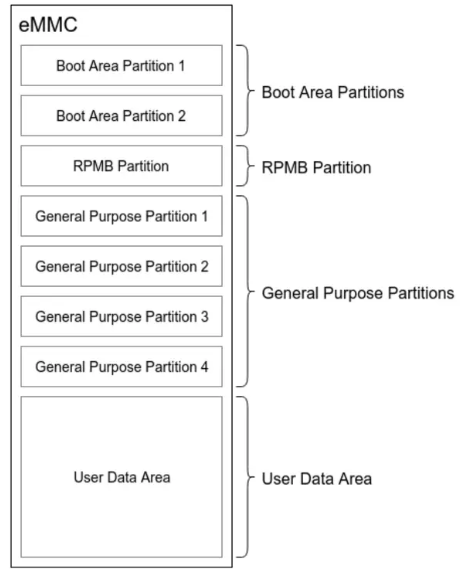
eMMC 的每一个硬件分区的存储空间都是独立编址的,既访问地址为 0-parition size ,
具体的数据读写操作实际访问哪一个硬件分区,是由 eMMC 的 ExtCSD 寄存器
中的 PARTITION_CONFIG Field Bit[2:0]: PARITION_ACCESS 决定的,用户可以通过
配置 PARTITION_ACCESS 来切换硬件分区的访问。也就是说,用户在访问特定的分区
前,需要先发送配置 PARTITION_ACCESS 命令, 然后再发送相关的数据访问请求。
4.1. Boot Area Parition
Boot Area 包含两个 Boot Area Parition ,主要用于存储 Bootloader ,支持 SOC 从 eMMC 启动系统。
通过设置 BOOT_SIZE_MULT(ExtCSD[226]) 可以改变 Boot Area Parition 的大小。 BOOT_SIZE_MULT 默认
为 0x20(32) ,应此 Boot Area Parition 默认大小为 128KB * 32 = 4MB 。 BOOT_SIZE_MULT 最大可以设置为
255 ,因此 Boot Area Parition 最大只能为 128KB * 255 = 31.875MB 。
4.1.1. 查看启动分区大小
# Read BOOT_SIZE_MULT
mmc extcsd read /dev/mmcblk1 |  grep BOOT_SIZE_MULT
## Boot partition size [BOOT_SIZE_MULTI: 0x20]
4.1.2. 设置启动分区
通过设置 PARITION_CONFIG(ExtCSD[179]) ,可以修改当前启动分区
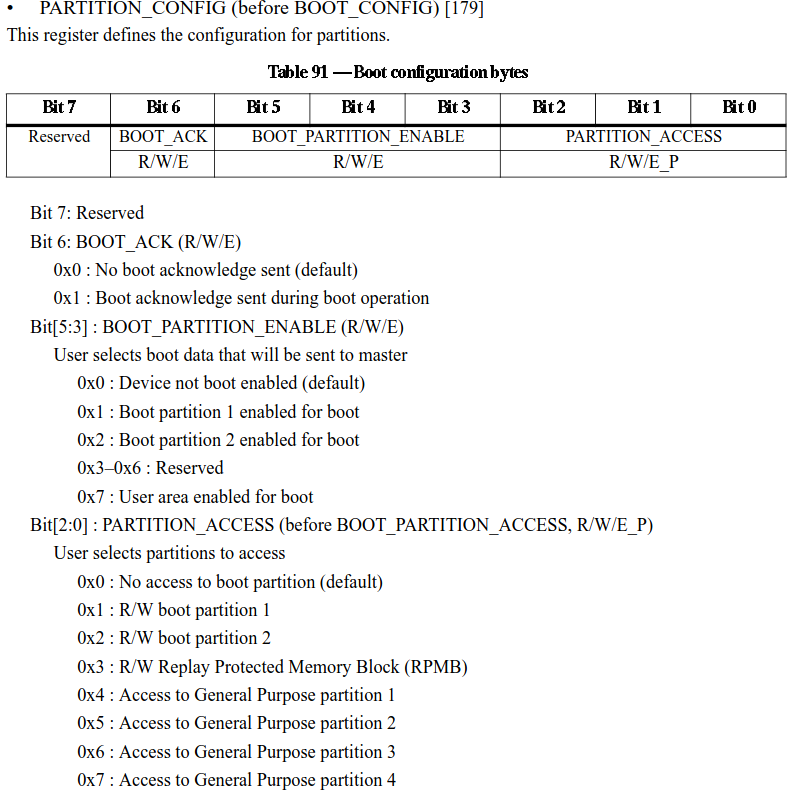
# Query current boot parition
mmc extcsd read /dev/mmcblk1 |  grep PARTITION_CONFIG
## Boot configuration bytes [PARTITION_CONFIG: 0x48]

# Set current boot parition to /dev/mmcblk1boot0
mmc bootpart enable 1 1 /dev/mmcblk1
4.1.3. 设置启动分区写保护
通过设置 BOOT_WP(ExtCSD[173]) ,使能当前启动分区的写保护。 BOOT_WP_STATUS(ExtCSD[174]) 可以查询当前启动分区写保护的状态。
NOTE: 想要开启写保护功能,每次上电都需要设置。
# Read current boot parition write protect status
mmc writeprotect boot get /dev/mmcblk1
## Boot write protection status registers [BOOT_WP_STATUS]: 0x00
## Boot Area Write protection [BOOT_WP]: 0x00
##  Power ro locking: possible
##  Permanent ro locking: possible
##  ro lock status: not locked

# Set current boot parititon write protect
mmc writeprotect boot set /dev/mmcblk1
# Get
mmc writeprotect boot get /dev/mmcblk1
## Boot write protection status registers [BOOT_WP_STATUS]: 0x05
## Boot Area Write protection [BOOT_WP]: 0x01
##  Power ro locking: possible
##  Permanent ro locking: possible
##  ro lock status: locked until next power on
4.1.4. 设置启动分区总线宽度
通过设置 BOOT_BUS_WIDTH(ExtCSD[177]) ,可以改变当前启动分区的总线宽度,从而提升启动速度。
NOTE: 需要根据 SOC 启动时支持的总线宽度来设置,不然会导致启动不了。
# Set boot bus width
mmc bootbus set <boot_mode> <reset_boot_bus_conditions> <boot_bus_width> <device>
## Set Boot Bus Conditions.
## <boot_mode> must be "single_backward|single_hs|dual"
## <reset_boot_bus_conditions> must be "x1|retain"
## <boot_bus_width> must be "x1|x4|x8"
4.2. RPMB(Replay Protected Memory Block) Parition
RPMB 是 eMMC 中的一个具有 安全特性 的分区。 eMMC 在写入数据到 RPMB 时,
会校验数据的合法性,只有指定的 Host 才能够写入,同时在读数据时,也提供了签名机制,
保证 Host 读取到的数据是 RPMB 内部数据,而不是攻击者伪造的数据。
RPMB 在实际应用中,通常用于存储一些有防止非法篡改需求的数据,例如手机上指纹支付相关
的公钥,序列号等。 RPMB 中的数据使用明文存储,因此存储到 RPMB 的数据通常会进行加密
后再存储。
RPMB Partition 的大小是由 RPMB_SIZE_MULT(ExtCSD[]) 决定,大小的计算公式如
下: Size = 128Kbytes x RPMB_SIZE_MULT 。 RPMB_SIZE_MULT 默认下为 0x20(32) ,
最大可以为 128 ,即默认为 4MB ,最大容量大小可以为 128 x 128 KB = 16384 KB = 16 MB 。
4.2.1. RPMB Read
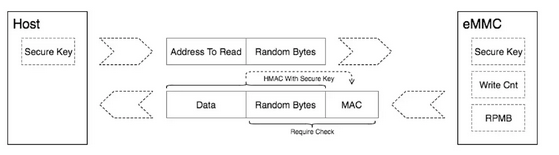
- 在
Host端,发送读请求以及一个16Bytes随机数给Device端 - 在
Device端,将请求的数据从RPMB取出来,通过AuthKey对Data + 随机数使用HMAC SHA-256算法签名后得到MAC,与Data + 随机数一起发送给Host端 - 在
Host端收到Devcie发送过来的数据,首先比较随机数是否与自己一致,如果一致,在Host端使用自己的AuthKey对接收到的Data + 随机数使用HMAC SHA-256算法签名 后得到MAC1,比较自己生成的MAC1与接收到的MAC是否一致。如果一致,Host端 就可以确定该Data是从RPMB读取到的,没有被修改过,而不是攻击者伪造的数据。
4.2.2. RPMB Write
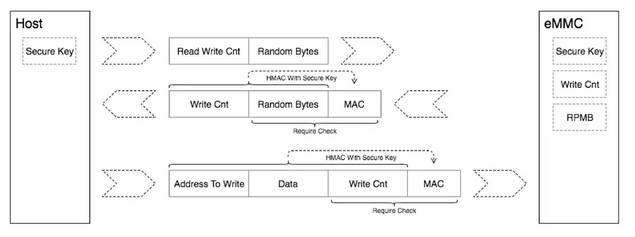
- 在
Host端:- 读取
Write Counter - 使用
AuthKey对Message(Data + Metadata) + Write Counter使用HMAC SHA-256算法签名后得到MAC - 将
MAC + Message + Write Counter传给Device
- 读取
- 在
Devices端:- 接受到
Host传送过来的MAC + Message + Write Counter - 比较接收到的
Write Counter是否与自己的一致 - 将接受到的
Message + Write Counter + devcies端的AuthKey经过SHA-256生成MAC1 - 将生成的
MAC1与接收到的MAC进行比较,如果两者一致,就将Data写入到RPMB中,Write Counter加1
- 接受到
4.2.3. RPMB 操作指令
# Set RPMB Authkey. Just program once(OTP)
mmc rpmb write-key <rpmb device> <key file>
## Program authentication key which is 32 bytes length and stored
## in the specified file. Also you can specify '-' instead of
##    key file path to read the key from stdin.
##    NOTE!  This is a one-time programmable (unreversible) change.
##    Example:
##    $ echo -n AAAABBBBCCCCDDDDEEEEFFFFGGGGHHHH | \
##        mmc rpmb write-key /dev/mmcblk0rpmb -

# Read write counter
mmc rpmb read-counter <rpmb device>
## Counter value for the <rpmb device> will be read to stdout.

# Read RPMB data
mmc rpmb read-block <rpmb device> <address> <blocks count> <output file> [key file]
## Blocks of 256 bytes will be read from <rpmb device> to output
## file or stdout if '-' is specified. If key is specified - read
## data will be verified. Instead of regular path you can specify
## '-' to read key from stdin.
## Example:
##   $ echo -n AAAABBBBCCCCDDDDEEEEFFFFGGGGHHHH | \
##     mmc rpmb read-block /dev/mmcblk0rpmb 0x02 2 /tmp/block -
## or read two blocks without verification
##   $ mmc rpmb read-block /dev/mmcblk0rpmb 0x02 2 /tmp/block

# Write RPMB data
mmc rpmb write-block <rpmb device> <address> <256 byte data file> <key file>
## Block of 256 bytes will be written from data file to
## <rpmb device>. Also you can specify '-' instead of key
## file path or data file to read the data from stdin.
## Example:
## $ (awk 'BEGIN {while (c++<256) printf "a"}' | \
##        echo -n AAAABBBBCCCCDDDDEEEEFFFFGGGGHHHH) | \
##     mmc rpmb write-block /dev/mmcblk0rpmb 0x02 - -
4.3. General Purpose Parition(GPP)
GPP 分区主要用于存储系统和应用数据。在很多使用 eMMC 的产品中, GPP 分区没有被启用,
因为它在功能上与 UDA 类似,产品上直接使用 UDA 就可以满足需求。 eMMC 最多可以支持
4 个 GPP 分区,每个 GPP 的大小可以单独配置。配置完成后每个分区的起始地址都是 0x0 ,
eMMC 标准中,为 GPP 定义了两类属性, Enhanced attribute 和 Extended attribute~。每
个 ~GPP 可以设定两类中的一种,不可以同时设定多个属性。
Enhanced attribute在eMMC标准中没有定义设置该属性的行为,由芯片厂商定义。Default: 未设定Enhanced storage media: 提高该分区的读写性能、寿命以及稳定性
Extended attribute在eMMC标准中没有定义设置该属性的行为,由芯片厂商定义。Default: 未设定System code: 主要用于存放操作系统类的、很少进行擦写更新的分区Non-Persistent: 主要用于存储临时的数据,例如tmp,swap等分区
4.3.1. 创建 GPP 分区
# Create GPP parition
mmc gp create <-y|-n|-c> <length KiB> <partition> <enh_attr> <ext_attr> <device>
## Create general purpose partition for the <device>.
## Dry-run only unless -y or -c is passed.
## Use -c if more partitioning settings are still to come.
## NOTE!  This is a one-time programmable (unreversible) change.
## To set enhanced attribute to general partition being created set
##  <enh_attr> to 1 else set it to 0.
## To set extended attribute to general partition
##  set <ext_attr> to 1,2 else set it to
4.4. User Data Area(UDA) Parition
普通用户分区